

Wise to Zoho Books Integration: Populate Bills and Categorize Transactions Easily
TransferWise payment platform, now known simply as Wise, was built to handle payments to individuals and organizations from around the world. A payment platform no-brainer was to integrate with QuickBooks. But let’s be honest, who likes QuickBooks? Many businesses are already annoyed by their pricing, poor customer service and nonsensical user interface. Three issues that Zoho Books doesn’t suffer from. But does Zoho Books check all the boxes necessary for a smooth transition? Well, not really. A Wise to Zoho Books integration is just one of many steps to ensure an easier and more successful migration.
We will explore all the challenges we experienced migrating to Zoho Books in our next post, where we’ll bring up every obstacle we faced when we migrated to Zoho Books. But first, let’s talk about the Wise to Zoho Books Integration and the stereotypical use case for it.
Table of Contents
Monthly or Quarterly Bookkeeping
It’s the end of the quarter and the bookkeeper is bugging you to categorize miscellaneous transactions. You swear you have already told them where to categorize these payments made from yesteryear. And yet, here we are. Miscategorized Profit and Loss sheets only exacerbated the situation. The business scales from 1 to 20; and the problem becomes 10 times worse.
Sounds familiar? This was a nightmare we dealt with for many years until we jumped into software development, developed a fondness for improving workflows and processes, and ultimately gained experience in API integrations. This ultimately shifted our focus from being a Managed Service Provider to more niche services that helped optimize our operations. We have gained a fair amount of clientele by passing on our optimization of systems and processes success stories to our clients through heavy use of middleware development via API integrations.
Populating Bill Data and Categorizing Transactions
Wise is challenging for a multitude of reasons when it comes to populating the correct data. The bookkeeper that scrapes the checking account statements will only grab the full transaction debit. In the following Zoho Books “Rafael” example, we explore all the challenges of populating Zoho Books Bills data and categorizing it correctly. One glance below and you can see what challenges the bookkeeper must overcome with Wise and the bill, not only for it to be populated in Zoho Books but also categorize correctly.
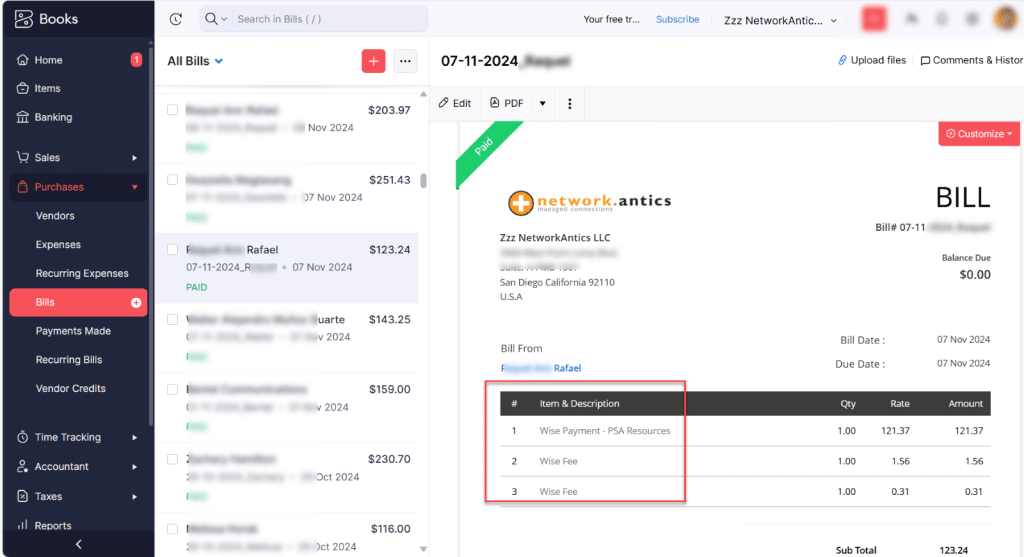
What the Bookkeeper Requires for Completing your Zoho Books
- Wise Fees
- The bookkeeper needs to know the fees for each Wise payment as illustrated above.
- Common Categorizations
- Professional Services
- COGS
- Passthru Item
The above details of a bill are simply not captured if the bookkeeper scrapes your bank statements. Every business requires clearly defined workflows based on their own unique use case, but who is creating that workflow well enough to define all the if/then variables and then developing the Wise to Zoho Books integration?
Wise to Zoho Books Integration: Populate Bills Data and Categorize Transactions Easily Summary
A payment platform like Wise can easily add up to thousands of transactions per year. That’s a lot of missed opportunities for tracking fees if your bookkeeper doesn’t sort out the enormous volume of fees accruing by utilizing Wise’s resources. We have found that the Wise to Zoho Books Integration pays for itself. The advantages are quite tangible: less time spent coding transactions, more accurate coding and, most importantly, the decision makers receiving real-time data to help them reach better decisions about the resources they utilize.
Do you need a custom workflow? We at NetworkAntics have ample experience with all sorts of integrations. Contact us and let’s talk about how we can improve your business through the power of APIs.

