

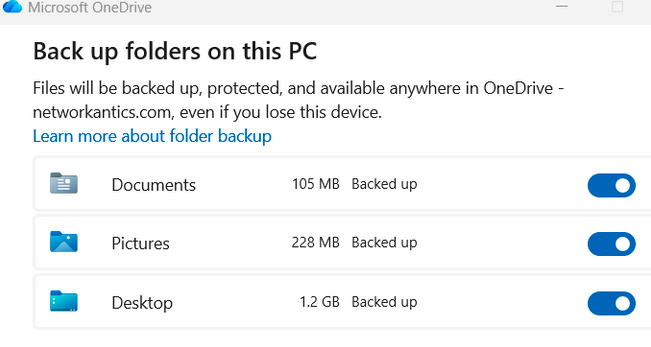
Most businesses move their data into the cloud and don’t think about backups ever again. Microsoft 365 and Google Workspace are big names when it comes to cloud backup services and carry a lot of weight. People assume that because they’re paying a monthly fee, their data is safe forever. OneDrive is a great example of this. As illustrated below, the interface says it’s “backup”, but a couple rewrites from Ransomware and data is gone unless you maintain a third-party backup solution.
Yes, cloud backup services platforms have some protections in place. And yes, they’ll often help you recover something if it was just deleted or overwritten recently. But those protections are limited, and the vendors are pretty clear about that if you dig into the details.
The problem is nobody digs into the details or reads the disclaimers until something breaks.
Table of Contents
Backup Challenges – A Real-World Example
NetworkAntics stumbled upon large environments (containing over a couple hundred users) and literally no backup running. Their infrastructure was running on 2012 servers and the Veeam backup died the year prior. This means nothing on the ESXi host is being backed up. Not a single server is being backed up. Cloud-based infrastructure for Exchange Mailbox, Sharepoint, and OneDrive is compromised if ransomware proliferates.
Fortunately, there are now ways around a broken and out-of-date infrastructure through utilizing RMM tools designed to perform image-based or file-based backup. Not to mention that enabling OneDrive sync can cover the desktop aspect of data backup. Their syncs head straight to the cloud where our backup software can be found backing up both Mailbox inboxes and OneDrive/SharePoint data.
Here are four very practical things you can do to avoid that situation:
1. Don’t Assume “Backup Included” Means What You Think It Means
Cloud backup services vendors love vague language like “data protection,” “built-in backup,” “recovery options.”
All of that sounds reassuring, but it doesn’t always mean your data is fully protected. Again, reference the above illustration to understand just how much is lacking by default in the 365 backup infrastructure.
Some cloud backup services only keep deleted files for a limited time. Others back things up once per day, which means anything created after that point could be gone if something happens. And in many cases, the backup is there to protect the platform itself, not to make sure your business can recover quickly.
This is where the boring stuff matters. Read the terms, look at retention periods, find reviews, and feedback from other customers. Find out what could be a problem and what you’re truly getting out of the deal. It’s not fun, but it’s better than finding out after the fact that the data you need is already gone.
2. Back Up What Matters, Not Just “Everything”
A lot of cloud backup services’ systems come with default settings enabled, and many businesses just leave it alone. It’s an understandable practice; people are busy and work doesn’t stop pouring in.
Not all data needs the same level of protection, however.
Some files change constantly. Some are critical to daily operations. Others haven’t been opened in years. Treating all of that the same way usually leads to one of two problems: either you’re not backing up enough, or you’re backing up way more than you need to.
Think about what would actually hurt if it disappeared: customer data, financial records, emails, shared documents people rely on every day. Those deserve more attention than old archives or unused folders.
It’s not that you’re meant to micromanage every little detail, but sometimes a little extra work now can save you a whole lot of time, money, and extra work later.
3. A Backup You’ve Never Tested Is Not Good Backup
This is the part people often skip.
They set up a backup, see a green check-mark, and move on to the next thing. Then months later, something goes wrong, and nobody is really sure if restoring the data will actually work, let alone how they expect it to. Needless to say, that’s not a great time to find out it doesn’t work, or that it’s not as simple as you had hoped.
Testing doesn’t have to be a big endeavor. Restore a few files, pull back a couple of emails. Make sure the process is clear, simple, and doesn’t take way longer than expected. If something fails, take that as a blessing. You found the problem before it actually became a problem!
For most businesses, testing once a week tends to be enough. But even if that’s too much, doing it at all is already a good start.
4. Data Loss Isn’t Always Technical
Not every data loss story comes from a server malfunction.
It can be a phishing email, or somebody clicking the wrong thing. Sometimes a folder gets deleted accidentally, and nobody notices until weeks later. Security issues and human errors cause more problems than most people expect. Never rely on people following protocol perfectly or doing everything right. You’ll often be disappointed. It’s just a part of the human experience.
Threats change all the time, which means your approach to protecting data should change too. Staying informed, even at a basic level, helps you avoid getting blindsided. Check out our guide on cybersecurity to help greatly improve your odds.
The 4 Best Practices for Small Businesses Using Cloud Backup Services Summary
Most small businesses move into Microsoft 365 and assume “it’s in the cloud, so it must be safe.” The cracks in that assumption only show up when an important email thread, shared folder, or Teams site quietly disappears, and nobody can quite explain where it went.
Cloud backup is really about having a second chance when something important goes missing. Most of the data that keeps a business running now lives in SaaS tools—email, files, shared workspaces, calendars—and those platforms have limits around how long they keep things and how quickly they can put them back.
An independent copy of that data takes the panic out of the picture. If an inbox is wiped, a folder is deleted by mistake, or a security issue scrambles files. There is a clean version sitting somewhere that is not tied to the same account, device, or settings that caused the problem. The focus is on backing up where work happens rather than trying to grab “everything” and hoping for the best.
Backup, though, is only one layer. A more complete approach combines that safety net with network monitoring (Domotz), security inspections (Roar), endpoint protection and management (SentinelOne, NinjaOne), and basic cybersecurity hygiene so fewer problems turn into full‑blown data loss stories. When those pieces work together, the goal is simple: avoid as many issues as possible and have a clear way to put things back when something slips through.
If all of this sounds like something you know you should deal with but never quite get around to, perhaps you just need an extra hand. Backup planning takes time, and it is not always obvious what you should be doing. An IT service provider like NetworkAntics can help sort through what matters, set things up properly, and make sure backups keep working over time.

