

Tech can be hard. It changes and evolves fast, it breaks often, it can get really complicated, and for small or mid-sized businesses, keeping up can feel impossible. Big companies have large IT teams and budgets to match. But if you’re running a lean operation, dealing with constant IT issues can take up time and resources you don’t have.
That’s where the benefits to managed IT can really make a difference. Whether you already have someone doing IT in-house or you’ve been piecing it together yourself, bringing in outside help can greatly improve the efficiency of your operations.
Still, not all IT service providers are created equal. Before you sign anything, here are a few things to think about, and a few red flags to watch for. It is critical to consider their prior experience and specialization in serving companies like yours before proceeding with any contract so that you may obtain the full benefits to managed IT.
Table of Contents
Questions to ask before choosing an IT service provider:
What size of user environment do they typically support?
- Sometimes Managed IT client pricing can be based on “Users”. We are comfortable serving up to 50-user environments. With that said, MSPs can’t be everything to everyone. Boutique firms will provide more hands-on experience with organizations under 50 users whereas large Managed Services firms may be better suited for larger organizations in specific verticals that they specialize in.
Have they worked with businesses in your industry before?
- While there should be some emphasis on this, it is better to see how much effort they have placed in the past with other organizations, such as documenting their SOPs for each firm they work with. An MSP emphasizing industry-specific service could be terrible at producing SOPs. This is at the core of understanding specific client issues, learning from past mistakes, and deploying SOPs to ensure better outcomes in the future.
How do they handle ongoing account management?
- Some organizations want to be left alone when things are already working. Others need a more hands-on approach. Managed IT must gauge the situation but also must mandate meetings where processes and communication are simply not performing well, and mediation must occur.
Do they perform regular tech checkups and network evaluations?
- Depending on the Managed IT stack, a lot of these checkups and assessments can be done throughout the year and notified in the form of monitoring tickets, but sometimes additional assessments must be made annually.
Are they able to support your current technology setup?
- We tend to push towards consolidating tech in a certain direction to improve operational efficiencies and our ability to reduce IT noise. Any mature Managed IT services company mandates hardware replacement with the organization within 3 to 5 years of initial deployment.
Do they offer a single monthly bill that covers everything?
- Invoice fatigue is real. Lots of Managed IT companies perform per-user-based billing, along with bills for a bunch of additional requests. Make sure you receive a complete stack of services. Needless to say, a large spike in new users, moving offices, big IT projects, or some other significant AMC (Add, Move, or Change) should be charged separately, but be careful of the nickel-and-diming.
What kind of value or return can you expect from investing in their services?
- A cost analysis should be provided for performing reactive IT vs. Managed IT.
What’s included in their standard Managed IT service stack?
- We wrote in depth about the type of IT personalities and the related stack of services to secure, maintain, and help in the deployment of new technologies and standard tech infrastructure. Below is a snippet from that page illustrating our stack. We feel that no Managed IT services company can competently support an organization without this bare minimum stack of IT services.
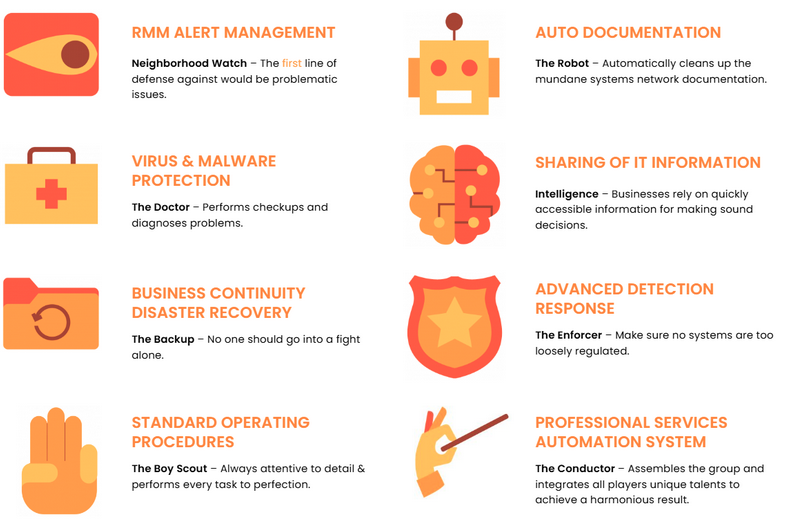
NetworkAntic’s Stack
Once all these questions have been answered, compare them to your requirements. Make sure they’re up to your standards so you can obtain the full benefits to managed IT.
IT service provider Red Flags
Here are the red flags for walking away from what would be bad Managed IT services situation:
No one comes onsite for a discovery
- We always bring someone in to perform a discovery before proceeding with a proposal for a long-term Managed IT business relationship. It is necessary to define the physical working environment. Lots of issues can arise during that discovery, bundled into a project, and resolved during the onboarding process.
One size fits all packages
- We treat every organization as if they are different because they are… Duh! This special attention gives you the sense that the salesman is not a “trunk slammer” or a slimy salesman, and the legitimate IT professionals really care about the overall health of the organizations.
Reactive vs Proactive Managed IT relationship
- Establishing a new relationship requires knowing, liking, and trusting. Sometimes that relationship can begin with a Block Hour purchase for a low-risk investment of 2 hours with the company, or possibly more if the ticket requires it. But the organization can proceed with a longer-term Managed IT relationship after the ticket or project is resolved. Defer back to our total cost analysis so that your organization can obtain a full understanding as to what IT contract relationship is best for them. At the heart of Managed IT lies a simple question; whether you want an IT contract that is proactive or reactive.
This is all Greek to me
- I have a great disdain for people who deliberately overcomplicate a subject just to prove their self-worth, or when they’re terrible at articulating what should otherwise be easy concepts. Whatever the case, kick them out the door if they can’t articulate high-level IT concepts in a simple manner or if they introduce overly complicated billing practices.
Adapt to the Audience
- We would love to have Fort Knox-level of security for every business, but budget constraints and ease of use should be highly considered when deploying IT infrastructure. For instance, you can’t deploy complex passwords without mandating password management. Otherwise, you will see password sticky notes and clear-text password Word documents everywhere, which then become security liabilities themselves.
- Another example is on the network side. Why deploy super sophisticated and costly networking hardware when it is expensive to purchase, hard to manage, and therefore even more pricey to maintain for a user environment of, say, 15 users? Deploying sensible network IT products that still accomplish much of the security for a fraction of the cost will resonate with smaller businesses and is one of the best benefits to managed IT.
The Challenges and Benefits to Managed IT: Why do Businesses Outsource to Managed Services Providers Summary
Knowing the type of contracts to begin and ultimately end with, plus questioning when conducting prospective Managed IT support is at the core of achieving a successful relationship with your future IT provider should allow you to avoid slimy salesmen and toxic relationships going forward. This guide should provide you with the knowledge to do just that and fully reap the benefits to managed IT support.
Check out our services and see for yourself if they fit your needs. If you think NetworkAntics is just right for you, contact us so we can find the best way to optimize how your business operates and show you how managed IT is done effectively.

