

Planning is everything. You should create a successful sales and marketing strategy before deploying an eCommerce website. Likewise, there are unique challenges when attempting to optimize Karmak inventory for Shopify sales success, which we’ll go into detail further down below.
Properly integrating Karmak with Shopify eCommerce allows your platforms to talk to each other seamlessly:
Karmak to Shopify:
- Sync product updates and changes
- Add or remove stock and products
- Adjust pricing
- Change inventory and quantities
- Automatically stop syncing archived products
Table of Contents
Karmak Inventory Unforeseen Challenges with Shopify
Some of the nuts and bolts of this integration between Karmak and Shopify can be brought to life by discussing your inventory and what exact inventory should be showcased for online viewing and purchase.
When you optimize Karmak inventory for Shopify, things can look great on paper, but real-world implementations often expose important details that weren’t initially considered. One such unforeseen challenge that came up is how to manage inventory visibility and control between two platforms, which might get in the way when you try to optimize Karmak inventory for Shopify.
We dealt with this when creating a Karmak to Shopify integration for a particular client. It illustrates how syncing too much inventory without a filter or without a clear strategy can lead to unnecessary clutter, delays, and rework. Here’s what that looked like:
- Ran the original sync, but Karmak synced 10,000 products, which created “clutter” as detailed below.
- The company wanted to manually control the number of products that get populated in Shopify and only these items would then be updated by Karmak.
- Shopify becomes the master
- “Archived” products are ignored. Karmak no longer automatically updates pricing, quantity or any other details on “archived” products.
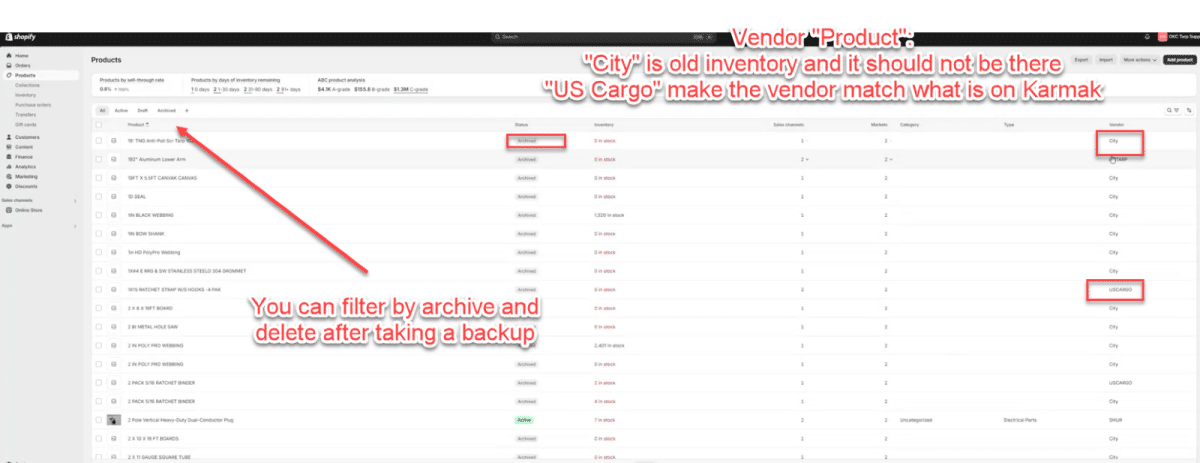
What is clutter?
Simply put, they are “inactive” items in Shopify. The bigger issue arises when you have 10,000 products in the Karmak business management platform that you don’t necessarily want in Shopify, like in this case. You can restore from backup on Shopify or run a script to automatically compare with the ones we want and delete the excess, which would be the “clutter”.
Rules can be set to make things easier. For instance, if Shopify product status is “archive”, then it should not be updated anymore. It looked something like this:
- Karmak will not add inventory to Shopify.
- Control the inventory from Shopify (not standard practice).
- Middleware logic
- If it is on Shopify, then update. If it is not on Shopify, then don’t add it.
With that, only what was already on Shopify will get updated, and if it isn’t on Shopify it won’t get automatically added and thus won’t get updated.
How to deal with Clutter?
Any sync from any platform can become troublesome if you sync without a predefined logic to filter what should or should not be synced. There are a couple of ways, good and bad, to deal with excess product clutter.
Bad Approach to Clutter:
- Go through them one by one and select which ones are not in use and set them to “archive” so that only the products you wish to update continue receiving updates.
It works, but it demands an absurd amount of time and effort, especially when you’re dealing with 10,000 items.
Good Approach to Clutter:
- Restore from an earlier backup on Shopify.
- Backup and filter products by “archive” and delete.
- Backup and run a script to compare the ones we want and delete the “clutter” .
Running the Sync Update – The Logic
You can set up the sync to not add any additional products to Shopify. The logic is set up to only update existing products. This basic logic that defines what we want to happen and what we don’t want to happen in the Shopify platform can be defined by a few key attributes:
- Active/Inactive Vendors
- Which vendors do you still maintain a relationship with?
- Action: Do not add if archived
- Which vendors do you still maintain a relationship with?
- Type of Product
- What products can you actually sell on the website? What parts do you sell over the counter in a physical shop? Perhaps some items are too big or desired for online sales and shipping.
- Action: Filter if it’s not a specific part or if it’s under a certain value
- What products can you actually sell on the website? What parts do you sell over the counter in a physical shop? Perhaps some items are too big or desired for online sales and shipping.
Additional Milestones in the API Integration Project
The software needs a “sign-off” from the client. This means the client needs to test the sync between the Shopify platform and Karmak to confirm that parameters like quantity and pricing are working as intended, and to test if purchases and other systems are functional. Sometimes we need clarity on challenges, like the “clutter”, which are getting in the way of the sign-off. Regular meetings must occur to avoid these delays in communication that ultimately can go sideways if not resolved quickly.
Recognize and Create a Game Plan to Resolve
It’s extremely important to create a game plan to resolve any issues that might arise to make sure they are addressed and fixed as soon as humanly possible. Here’s an example:
- Run one sync with the company signing off.
- If the sync does not currently run:
- Need sign-off on one sync.
- Need sign-off for one purchase.
- Sync polls every couple of minutes when operational. Middleware is not “published” which means no sync is happening.
- Set up a weekly sync on Wednesday at noon to test
- Zero stock – it archives in Shopify as the default setup, but the company did not want this default API inventory setup.
Optimize Karmak Inventory for Shopify Sales Success: Boost Truck Parts Sales with an eCommerce Integration Summary

Karmak and Shopify are powerful platforms on their own, but without a carefully planned sync strategy, especially around inventory control, what starts as a time-saving solution can quickly become a data management headache. As we’ve seen, syncing too many products without logic leads to clutter, inaccurate storefronts, and wasted hours manually cleaning up what shouldn’t have been pushed in the first place.
The key to optimize Karmak inventory for Shopify is a middleware solution that understands your business rules, filters out the noise, and keeps your parts inventory lean, accurate, and ready to sell online. Consider adding other integrations to the mix to help boost the efficiency of your workflow even further, like a CRM solution integrated to your eCommerce platform for improved client engagement.
At NetworkAntics, we specialize in building custom middleware solutions that connect Karmak with platforms like Shopify and more. Whether you’re starting your eCommerce journey or looking to fix an existing integration that isn’t delivering, we can help design and implement a system that actually works for your business.
Let’s talk about how we can help you optimize Karmak inventory for Shopify and start selling smarter today.

